Skip to content
RadarOpus UK, leading homeopathy software
  • HOME
  • SHOP
    • How to buy
    • Packages
    • Repertories
    • Materia Medica
    • Modules
    • Starter Packs
    • Bundles
    • Upgrades
    • Updates
    • RadarOpus
      • RadarOpus software packages
      • Synthesis
      • Classical Repertories
      • Boenninghausen
      • RadarOpus modules and specialist tools
      • Patient File
      • Vet Additions
      • Families
      • Concepts
      • Compare with Similia
      • Prices in the UK
      • RadarOpus on Mac
      • Synthesis editions
      • Buying in the UK
    • OpusGo App for iOS & Android
    • Read the Manual
    • Installation
    • Software License
    • Blog
    • Contact
    • About Luke Norland
    • Support
    • Register
    • Newsletter
    • Meet the team
    • Facebook group
Email us
Training Purchase Free Trial Download
Chat to usWhatsApp

RadarOpus homeopathy software

A desktop workspace for repertory research, materia medica, case analysis and patient files. Explore the tools, compare packages and check the requirements for your computer.

Check system requirements · Compare packages

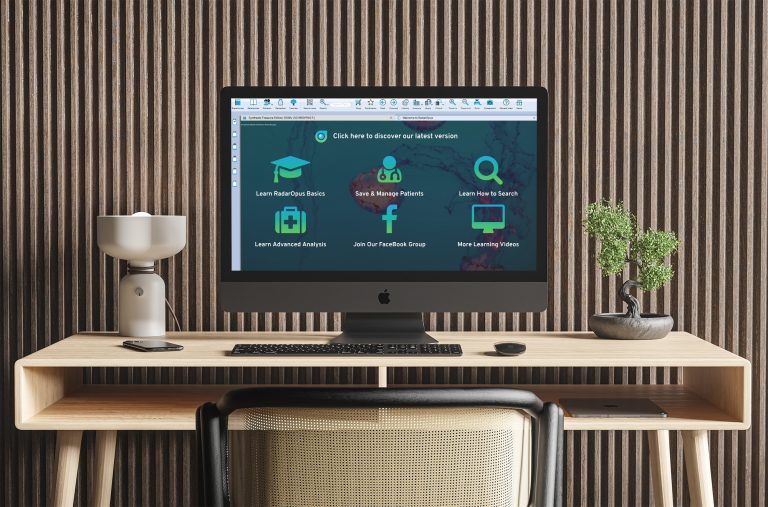
We have modernised the look and feel of our Homeopathic Software to make it easy to use without sacrificing on depth of functionality. All the most important functions are accessible from icons, menus and key commands, so even the beginner can quickly get to grips with the program. RadarOpus has a familiar ‘tabbed layout’ (like all internet browsers), so navigation around the program is so simple, leaving you to focus on the all-important task of solving the case in front of you.

In your search for the simillimum, you can move seamlessly between the patient file, repertory, materia medica and search tool as you analyse your case. The program is intuitive, clearly laid out and easy to learn with access to specialist representatives all over the world. Our product range goes from entry-level (perfect for students) through to the most advanced solutions (ideal for advanced practitioners and medical homeopaths).

RadarOpus Homeopathic Software

Everything you need in one interface

We take pride in our creative suite of tools for both modern & classical approaches to Homeopathy and would like to highlight our software’s unique qualities

Tools for study and practice

  • Repertory and materia medica search
  • Case analysis and remedy comparison
  • Patient files and practice tools
  • Optional specialist modules and libraries
  • A tabbed workspace for moving between sources
  • Desktop editions for Windows and Mac

Features and books depend on your package and engine. Explore the packages or ask us which edition suits you.

For mobile study, explore the separate OpusGo app for iOS and Android.

A homeopathic reference library

Explore repertories, materia medica, provings, journals and clinical cases from one workspace.

Build a library around your work. Available titles span classical and contemporary authors, repertories and specialist modules. The documents supplied vary by package, language and optional purchases.

Explore the publisher’s content catalogue.

Be inspired to research the old and new

In RadarOpus, you can:

  • Easily and quickly combine several sources for your own articles or assignments.
  • Copy and paste rubrics and materia medica.
  • Take screenshots of your Analysis to share with teachers and colleagues.
  • Send your case to a teacher / colleague for supervision / teaching.
 

Keep learning

Support as you explore.

  • Build confidence with software training and tutorials.
  • Explore webinars and demonstrations of RadarOpus tools.
  • Ask for help choosing your Synthesis edition or software package.
Find supportExplore video tutorialsAsk for guidance

To make the most of our amazing library, you need a powerful & versatile search tool

RadarOpus boasts a simple yet powerful search tool to investigate your entire library in seconds. That means you can browse results from all repertories and materia medica simultaneously! Any source of information can be transformed into a custom rubric in your Analysis or viewed with our totally unique Graphic Analysis Module. So, whether you find that all-important characteristic symptom in Synthesis, Phatak’s repertory, a Journal, Case or Proving, you can always utilize that information in the most practical way – helping you to solve your case with the minimum fuss!

You can:

  • Comb your library for combinations of keywords within a sentence, paragraph or set number of words.
    This could be in a rubric or in Keynotes, Provings, Materia Medica or a published case. You can then extract your findings graphically or create your own custom rubrics direct from the source material.
  • Open several search tabs at once and create a bar-graph analysis.
    A radical new way to repertorise using your entire library of books.
    Watch Video Tutorial here.
  • Turn any symptom in the Materia Medica into a rubric!
    Search results from all documents can be instantly combined to a custom rubric to augment the traditional repertory results.
    Watch Video Tutorial here.
  • Extract all the rubrics for any remedy.
    Choose to see the italic, bold or underlined rubrics. Find the single-remedy rubrics (SRP). Find the rubrics where the remedy is not outranked by any other… + more!
    Watch Video Tutorial here.
  • Compare any number of remedies side by side.
    E.G. Search for your leading 5 remedies in the modalities chapter of Boger’s Repertory to compare how they match your case.
    Watch Video Tutorial here.
  • Specify a word-wrap to locate precision symptoms.
    E.G. search for (pain back stooping amel) within a string of 6 words.
    Watch Video Tutorial here.
  • Search for a family.
    Locate the common rubrics of a particular family.
    Watch Video Tutorial here.
  • Create your own document mix.
    Choose your favourite Repertories and Materia Medica to search in. E.G, want to search only in pure materia medica? Select Hering, Allen and Hahnemann. Want to see the Genius approach? Select Boger, Phatak and Vermeulen.
    Watch Video Tutorial here.
  • Search by chapters, cases, pathologies or type of book
    Provings, journals, keynotes, materia medica and more…
  • Create a Search Area based on the chapters and rubrics most frequently used for certain types of case.
    E.G, When you are researching possible remedies in a differential diagnosis, research each remedy candidate through your custom Search Area for a targeted appraisal of the remedy’s suitability.

+ MORE! Visit the Academy Section.

Your workspace, connected

Why use RadarOpus?

Bring your reference library, research and case work together. Choose the package and optional tools that suit the way you work.

A connected library

  • Synthesis repertory editions
  • Classical and contemporary materia medica
  • Search across the documents in your library

Explore Synthesis Adonis

Tools for your approach

  • Patient files and case management
  • Flexible case analysis and specialist modules
  • Family themes and maps in relevant add-ons
Explore specialist modules

Choose with confidence

  • Compare package contents and current prices
  • Learn through tutorials and training
  • Get help choosing your edition and tools
Compare the packages

Included books, features and analysis tools vary by package, engine and optional purchases.

Before you install

RadarOpus 4.2 system requirements

Check your computer against the publisher’s current download guidance.

Windows

Windows 11 is listed for the current installer. The publisher’s requirements also list Windows 10; confirm the appropriate installer with support if you use Windows 10.

Mac

macOS 15 Sequoia or later is listed for the current release. Intel Core i or Apple Silicon processors are recommended.

Memory
8 GB RAM or more recommended.
Storage
25 GB free disk space. The publisher specifies NTFS for Windows storage.
Display
Minimum 1400 × 1050 pixels; Full HD recommended.
Processor
Intel Core i or Apple Silicon recommended.
Internet
Required for first activation, then every 30 days for a dongleless licence or every 12 months for a dongle licence.
USB
Required when installing from a USB drive.

Checked 19 October 2026. Official requirements and downloads.

Already using RadarOpus?

Version 4.2 is the latest release listed in the official version history. Check your licence and back up personal data before updating. Older operating systems may require a legacy release; ask for advice before choosing an installer.

Check compatibility with Radar UK

  • System Requirements
  • Zeus Soft Company Info
  • Zeus Soft T&C’s
  • Privacy Policy
  • Download
  • Cookie Policy

Copyright 2026 RadarOpus UK | Leading Homeopathy Software